Home
Tutorials
Below you will find video tutorials of operations which can be performed by SPIP™. You can view the tutorials on-line or download them to your PC.

If you download and save the tutorials, you will be able to play them from the SPIP Online pane in SPIP™

Display format      Sorting order  

3D Visualization Studio
3D Animation
This demonstration will show you how create convincing 3D animations.3D Animation

3D Overlay and Wireframe
This demonstration will show you how to overlay images in 3D and display wireframes.3D Overlay and Wireframe

3D View Settings
This demonstration will show you how change the 3D appearance of your images.3D View Settings


Basic
2D View Settings
This demonstration will show you how to customize the view settings of your 2D windows.2D View Settings

Customizing the User Interface
This demonstration will show you how to customize the SPIP user interface.Customizing the User Interface

Image Calculator
This demonstration will show you how to do pixel-wise algebraic operations on images.Image Calculator

Measure Tools
This demonstration will show you how to use the manual measure tools in SPIP.Measure Tools

Multi Line Profiling
This demonstration will show you how to use the multi line profiling tool to easily compare features in your image.Multi Line Profiling

Organizing Panes
Panes offer several advantages over conventional dialogs as they may be docked, auto-hided, and tabbed. This demonstration will show you how to organize and lay out panes.Organizing Panes

Plane Correction (levelling)
This demonstration will show you how to plane correct (level) your images automatically and manually.Plane Correction (levelling)


Batch Processing
Batch Processing and Active Reporting
This demonstration will show you how to batch process files and create reports by templates.Batch Processing and Active Reporting

Roughness Plug-In
This demonstration will show you how to create a user plug-in to calculate your roughness parameters in SPIP. You will learn how to integrate your own parameters in the SPIP user interface and in Active Report templates.Roughness Plug-In


Calibration
Critical Dimensions
This demonstration will show you how to measure step height, line width, slope angle, and other critical dimensions.Critical Dimensions

Hysteresis Correction
This demonstration will show you how to remove hysteresis from your images with just a single mouse click.Hysteresis Correction

Lateral Calibration
This demonstration will show you how calibrate your images laterally.Lateral Calibration

Unit Cell Detection
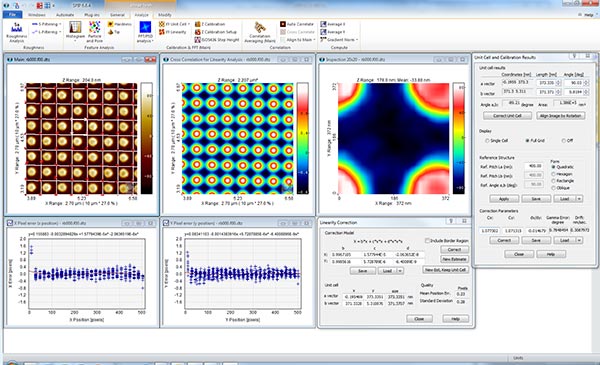
This demonstration will show you how to automatically detect unit cell structures and measure Fourier peaks.Unit Cell Detection

Z-Calibration and Step Height
This demonstration will show you how to measure step heights automatically and calibrate the height of your images.Z-Calibration and Step Height


CITS Continuous Imaging Tunneling Spectroscopy
CITS Spectroscopy
This demonstration will show you how to visualize and analyze I/V spectroscopy data.CITS Spectroscopy


Correlation Averaging
This demonstration will show you how to enhance repeated structures by correlation averaging. Correlation Averaging


Extended Fourier Analysis
Noise Reduction by Fourier Filtering
This demonstration will show you how to remove remove noise by selective Fourier threshold filtering.Noise Reduction by Fourier Filtering

Removing Waviness
This demonstration will show you how to remove waviness from your images by Fourier band filtering and Gaussian filtering.Removing Waviness


Filter
Filtering Directional Noise
This demonstration will show you how to remove directional artifacts without disturbing the true surface signal of your image.Filtering Directional Noise

Filtering Outlier Objects
This demonstration will show you how to remove artifacts and/or outlier objects without disturbing the true surface signal of your image.Filtering Outlier Objects

Removing Waviness
This demonstration will show you how to remove waviness from your images by Fourier band filtering and Gaussian filtering.Removing Waviness


Force Curve Analysis
Force Curve Analysis (General)
This demonstration will show you how to analyse a force curve.Force Curve Analysis (General)

Force Curve Analysis (Indentation)
This demonstration will show you how to caculate Young´s Modulus for force indentation experiments.Force Curve Analysis (Indentation)

Force Curve Analysis (Pulling)
This demonstration will show you how to fit the WLC model for force curve pulling experiments.Force Curve Analysis (Pulling)

Force Volume
This tutorial will show you how to analyze force volume data.Force Volume


Imagemet Explorer
File Importer Plug-In
This demonstration will show you how to add your own file reader plug-in to SPIP. File Importer Plug-In

Imagemet Explorer
This demonstration will show you how to use the Imagemet Explorer to browse, find, and report files.Imagemet Explorer


Movie & Time Series Analysis
Movie and Time Series Analysis
This demonstration will show you how to create movies by defining a sequence of frames for playback and export to .mpeg and .AVI.Movie and Time Series Analysis


Particle & Pore Analysis
This demonstration will show you how to detect and analyze particles, pores, grains, and other surface features. Particle & Pore Analysis

Particle & Pore Analysis Webinar (RECORDED)
During this 45 minutes webinar you will learn how to detect and quantify particles, pores, grains, defects and other surface features on various surfaces. You will learn how easy it is to detect your surface features automatically and how to analyze them by spread sheet style reports and histograms.Particle & Pore Analysis Webinar (RECORDED)


Plug-In Interface
File Importer Plug-In
This demonstration will show you how to add your own file reader plug-in to SPIP. File Importer Plug-In

Plug-In Interface
This demonstration will introduce you to the Plug-In Interface, which allows you to add your own C++ and Visual Basic projects to SPIP.Plug-In Interface

Roughness Plug-In
This demonstration will show you how to create a user plug-in to calculate your roughness parameters in SPIP. You will learn how to integrate your own parameters in the SPIP user interface and in Active Report templates.Roughness Plug-In


Roughness & Hardness Analysis
Hardness Analysis
This demonstration will show you how analyze indentation experiments and calculate hardness parameters.Hardness Analysis

Removing Waviness
This demonstration will show you how to remove waviness from your images by Fourier band filtering and Gaussian filtering.Removing Waviness

Roughness Analysis
This demonstration will show you how to carry out a full roughness analysis of your image with just a single mouse click.Roughness Analysis

Roughness Plug-In
This demonstration will show you how to create a user plug-in to calculate your roughness parameters in SPIP. You will learn how to integrate your own parameters in the SPIP user interface and in Active Report templates.Roughness Plug-In


Tip Characterization
This demonstration will show you how to estimate the 3D shape of your tip and deconvolute your images.Tip Characterization
RSS 2.0